
Do you want to make your PDFs more engaging, professional, and interactive?
Static PDFs can feel boring — especially when you’re trying to impress clients, present portfolios, or share marketing materials.
That’s where FlipBooklets comes in.
In this review, you’ll discover:
- What FlipBooklets is
- Key features
- How it works
- Who should use it
- Pros & cons
- Final verdict
You also can read about “Digital Marketing Posts.”
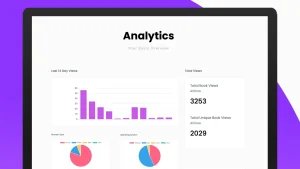
What Is FlipBooklets?
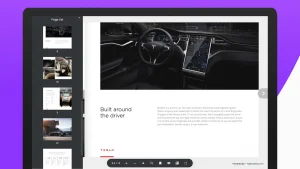
FlipBooklets is an online tool that converts your static PDF files into interactive digital flipbooks with realistic page-turning effects.
Instead of sharing plain PDFs, you can create:
- Digital magazines
- E-books
- Brochures
- Catalogs
- Portfolios
- Reports
These flipbooks look more engaging and professional — similar to reading a real book online.
Why Use FlipBooklets?
First impressions matter — especially in digital marketing.
FlipBooklets helps you:
✔ Present content in a visually appealing way
✔ Increase user engagement
✔ Improve readability
✔ Make your brand look more professional
It’s especially useful for businesses that want to stand out with modern presentations.
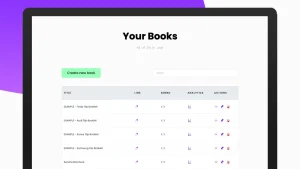
Key Features of FlipBooklets
📄 PDF to Flipbook Conversion
Upload your PDF and instantly turn it into an interactive flipbook.
🔄 Realistic Page Flip Effect
Create a smooth, book-like reading experience that keeps users engaged.
🎨 Custom Branding
Add your logo, brand colors, and custom design elements.
🔗 Share & Embed Anywhere
Easily share your flipbook via link or embed it on your website.
📱 Mobile-Friendly Design
Flipbooks work perfectly on mobile, tablet, and desktop devices.
☁ Cloud Hosting
No need for external hosting — your flipbooks are stored online and ready to share.
How FlipBooklets Works
Using FlipBooklets is very simple:
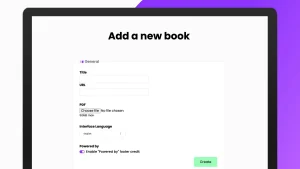
1️⃣ Upload Your PDF
Choose any document you want to convert.
2️⃣ Customize Your Flipbook
Add branding, adjust layout, and configure settings.
3️⃣ Publish & Share
Generate a shareable link or embed it on your website.
Within minutes, your static document becomes an interactive experience.
Here is “Email Marketing Expert Tips”
Who Should Use FlipBooklets?
FlipBooklets is ideal for:
📊 Marketers
Create engaging brochures, lead magnets, and presentations.
🏢 Business Owners
Showcase products, catalogs, and company profiles professionally.
🎨 Designers & Creators
Present portfolios in a visually appealing format.
📚 Educators
Share study materials, guides, and e-books interactively.
💼 Freelancers & Agencies
Deliver client reports and proposals in a premium format.
👉 Start using FlipBooklets here.
FlipBooklets Pros & Cons
✅ Pros
✔ Easy to use
✔ Professional-looking output
✔ Improves user engagement
✔ Works on all devices
✔ No coding required
✔ Cloud-based hosting
❌ Cons
✘ Requires PDF files to start
✘ Advanced customization may be limited
✘ Best results depend on PDF design quality
FlipBooklets vs Traditional PDFs
Traditional PDFs:
- Static and less engaging
- Harder to present professionally
- Limited interactivity
FlipBooklets:
✔ Interactive and dynamic
✔ Visually attractive
✔ Better user experience
✔ Higher engagement
If you want your content to stand out, flipbooks are a big upgrade.
Is FlipBooklets Worth It?
Yes — especially if you regularly share PDFs for marketing or business.
FlipBooklets helps you:
- Make content more engaging
- Improve presentation quality
- Increase user interaction
- Build a stronger brand image
It’s a simple tool that can make a big difference in how your content is perceived.
Final Verdict
FlipBooklets is a powerful yet easy-to-use tool for turning PDFs into interactive digital experiences.
If you want to:
✔ Impress your audience
✔ Create engaging digital content
✔ Upgrade your presentations
✔ Share professional documents
Then FlipBooklets is definitely worth trying.
Click For Go To All Recent Posts.