
Typing long emails, blog posts, or reports can take a lot of time. But what if you could simply speak your ideas and instantly turn them into polished text?
That’s exactly what VoiceDash is designed to do.
VoiceDash is an AI-powered voice typing tool that converts spoken words into clean, structured writing in real time. Instead of typing every sentence manually, you can simply talk while the software handles transcription, grammar corrections, and formatting automatically.
In this review, we’ll explore:
- What VoiceDash is
- Key features
- Who should use it
- Pricing overview
- Pros and cons
- Final verdict
Let’s dive in.
You also can read about “Digital Marketing Posts.”
What Is VoiceDash?
VoiceDash is an AI speech-to-text productivity tool that transforms spoken ideas into written content instantly. It captures your voice and converts it into polished text while automatically correcting grammar, punctuation, and filler words.
The goal of VoiceDash is simple:
👉 Write at the speed you think — just by speaking.
Instead of slowing down to type, users can dictate emails, notes, blog drafts, reports, and messages while the software converts everything into readable text.
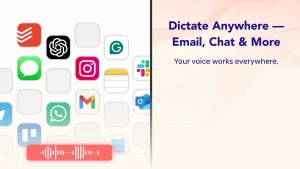
VoiceDash works across many applications, meaning you can use it inside:
- Email clients
- Word processors
- Chat tools
- Documentation software
- Content writing platforms
This makes it a useful productivity tool for professionals and creators.
How VoiceDash Works
VoiceDash is designed to be simple and beginner-friendly.
1. Install the Application
Download the VoiceDash desktop application and launch it on your device.
2. Press the Dictation Hotkey
Activate the voice dictation feature using a hotkey or command.
3. Speak Naturally
You can talk normally without slowing down. The system recognizes natural speech patterns.
4. Get Instant Polished Text
VoiceDash converts speech into structured writing while fixing grammar and removing filler words automatically.
The result is clean, ready-to-use text that can be sent or edited immediately.
Here is “Email Marketing Expert Tips”
Key Features of VoiceDash
Here are some of the most useful features that make VoiceDash popular.
AI Voice Typing
VoiceDash converts speech into text in real time with high accuracy, allowing users to create content faster than typing manually.
Smart Grammar Editing
The AI automatically corrects punctuation, grammar, and sentence structure to produce professional-quality writing.
Filler Word Removal
It removes unnecessary words like “um,” “uh,” and pauses, creating smoother and more readable text.
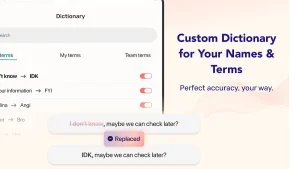
Personal Dictionary
Users can add custom terms or industry-specific words so the AI recognizes them correctly.
Snippet Libraries
Frequently used responses or phrases can be saved and inserted quickly using snippet shortcuts.
Works Across Applications
VoiceDash works with most apps on your device, meaning you can dictate text directly into emails, documents, and chat tools.
Who Should Use VoiceDash?
VoiceDash is useful for many professionals and creators.
Bloggers & Content Creators
Create blog drafts quickly by speaking instead of typing.
Marketers
Dictate marketing copy, social media captions, and campaign ideas.
Business Professionals
Write reports, notes, and emails faster.
Customer Support Teams
Respond to tickets and messages more quickly using voice dictation.
Students & Researchers
Capture ideas or notes during study sessions or lectures.
If you often write large amounts of text, VoiceDash can significantly speed up your workflow.
VoiceDash Pricing Overview
VoiceDash offers several pricing options depending on usage.
Typical plans include:
- Free plan – basic voice typing with limited word usage
- Pro plan – unlimited words with advanced AI editing
- Team plans – collaboration features for multiple users.
There are also lifetime deals available through special promotions, allowing users to pay once and access the software permanently with certain usage limits.
Pros and Cons
Pros
✔ Very fast speech-to-text conversion
✔ Saves time on writing tasks
✔ Works across multiple applications
✔ AI automatically fixes grammar
✔ Useful for content creators and professionals
Cons
✘ Requires a microphone and quiet environment
✘ Accuracy may vary with strong accents
✘ Advanced features may require paid plans
VoiceDash vs Traditional Typing
Traditional typing requires:
- Manual editing
- Slow typing speed
- Interrupting your thought process
VoiceDash allows you to:
✔ Capture ideas instantly
✔ Stay focused while speaking
✔ Produce more content in less time
Many users find that speaking is often 3–4 times faster than typing, which can dramatically increase productivity.
Is VoiceDash Worth It?
For people who write frequently, VoiceDash can be a powerful productivity tool.
It helps you:
- Write faster
- Capture ideas instantly
- Reduce typing fatigue
- Improve workflow efficiency
If you create content regularly or handle large amounts of communication, voice dictation tools like VoiceDash can save hours every week.
Final Verdict
VoiceDash is a modern AI productivity tool designed to make writing faster and easier. By converting speech into polished text instantly, it allows users to focus on ideas instead of typing.
For bloggers, marketers, freelancers, and professionals, VoiceDash can be a valuable addition to your productivity toolkit.